
Exam Name: Configuring Windows 10 Devices (70-697日本語版)
Certification Provider: Microsoft
Corresponding Certification: MCSA: Windows 10

Over 62146+ Satisfied Customers
Instant Download Microsoft : 70-697日本語 Exam Dumps

Updated: Nov 27, 2026
No. of Questions: 340 Questions & Answers
Download Limit: Unlimited
Instant Download: Upon successful payment, Our systems will automatically send the product you have purchased to your mailbox by email. (If not received within 12 hours, please contact us. Note: don't forget to check your spam.)
100% Money Back Guarantee
ActualTestsIT has an unprecedented 99.6% first time pass rate among our customers.  We're so confident of our products that we provide no hassle product exchange.
- Best exam practice material
- Three formats are optional
- Learn anywhere, anytime
- 100% Safe shopping experience
- 10 years of excellence
- 365 Days Free Updates
70-697日本語 Online Test Engine
- Online Tool, Convenient, easy to study.
- 70-697日本語 Practice Online Anytime
- Instant Online Access 70-697日本語 Dumps
- Supports All Web Browsers
- Test History and Performance Review
- Supports Windows / Mac / Android / iOS, etc.
- Try Online Engine Demo
- Total Questions: 340
- Updated on: Nov 27, 2026
- Price: $79.00
70-697日本語 Desktop Test Engine
- Installable Software Application
- Practice Offline Anytime
- Builds 70-697日本語 Exam Confidence
- Simulates Real 70-697日本語 Exam Environment
- Two Modes For 70-697日本語 Practice
- Supports MS Operating System
- Software Screenshots
- Total Questions: 340
- Updated on: Nov 27, 2026
- Price: $79.00
70-697日本語 PDF Practice Q&A's
- Printable 70-697日本語 PDF Format
- Instant Access to Download 70-697日本語 PDF
- Study Anywhere, Anytime
- Prepared by Microsoft Experts
- Free 70-697日本語 PDF Demo Available
- 365 Days Free Updates
- Download Q&A's Demo
- Total Questions: 340
- Updated on: Nov 27, 2026
- Price: $79.00
Different candidates need different starting points, and good material respects that. The Microsoft Configuring Windows 10 Devices (70-697日本語版) package from ActualTestsIT contains 340 practice questions spanning basic to advanced content.
Microsoft 70-697日本語 Exam Overview:
| Certification Vendor: | Microsoft |
|---|---|
| Exam Name: | Configuring Windows Devices |
| Exam Number: | 70-697 |
| Real Exam Qty: | 40-60 |
| Certificate Validity Period: | Retired; certification remains valid until June 30, 2021 |
| Exam Price: | $165 USD |
| Available Languages: | Spanish, Chinese (Simplified), Portuguese (Brazil), Japanese, Russian, English, German, French |
| Exam Duration: | 120 minutes |
| Related Certifications: | MCSA: Windows 10 |
| Exam Format: | Multiple Choice, Drag-and-Drop, Case Studies, Build List and Reorder, Simulation |
| Passing Score: | 700/1000 |
| Recommended Training: | Course 20697-2: Managing and Maintaining Windows 10 Course 20697-1: Installing and Configuring Windows 10 |
| Exam Registration: | Pearson VUE Registration Microsoft Exam 70-697 Official Page |
| Sample Questions: | DOWNLOAD DEMO |
| Exam Way: | Retired exam; previously available as in-person at Pearson VUE centers or online proctored |
| Pre Condition: | No mandatory prerequisites; recommended: Windows desktop administration experience, basic networking knowledge, familiarity with Active Directory and Intune |
| Official Syllabus URL: | https://learn.microsoft.com/en-us/credentials/certifications/exams/70-697 |
Microsoft 70-697日本語 Exam Syllabus Topics:
| Section | Weight | Objectives |
|---|---|---|
| Manage Data Access and Protection | 10-15% | - Configure file and folder access - Configure EFS and data recovery - Implement BitLocker encryption - Implement data loss prevention |
| Manage Identity | 10-15% | - Configure and manage user accounts - Implement Microsoft Passport and biometrics - Configure domain and Azure AD integration - Manage authentication and authorization |
| Configure Storage | 10-15% | - Manage OneDrive and cloud storage - Implement Storage Spaces - Configure file systems and permissions - Manage disks and volumes |
| Manage Updates and Recovery | 10-15% | - Configure Windows Update settings - Manage update deployment and patching - Troubleshoot startup and boot issues - Implement system restore and recovery options |
| Plan Desktop and Device Deployment | 10-15% | - Implement provisioning and imaging - Configure Windows 10 editions and licensing - Plan installation and upgrade paths - Configure Hyper-V and virtual machines |
| Manage Remote Access | 10-15% | - Implement VPN and DirectAccess - Configure Remote Desktop and Remote Assistance - Manage remote connectivity security - Configure mobility settings |
| Manage Apps | 10-15% | - Implement app virtualization - Manage apps from Microsoft Store - Install and configure desktop apps - Control app access and compatibility |
| Plan and Implement Intune Device Management | 10-15% | - Manage mobile application management - Enroll devices in Intune - Configure compliance and configuration policies - Integrate with Azure AD and Office 365 |
| Configure Networking | 10-15% | - Configure network security and firewall rules - Configure IP addressing and name resolution - Manage wired and wireless networks - Troubleshoot network connectivity |
70-697日本語 Exam Practice FAQ
Memorizing which option is correct works only until the question is reworded. Understanding the concept behind each 70-697日本語 question lets you handle variations with confidence. Take notes as you practice, mark the key points, and your study sessions build real, durable knowledge.
The Microsoft Configuring Windows 10 Devices (70-697日本語版) practice questions are organized around the official exam objectives. Key topics include:
- Configure Storage (10-15%)
- Manage Identity (10-15%)
- Manage Apps (10-15%)
Questions across these topics span a range of difficulty levels, so both newer and experienced candidates find appropriate challenges.
You can register for the Microsoft Configuring Windows 10 Devices (70-697日本語版) exam through the official channels:
Many candidates combine practice questions with official training. Recommended options include:
The Microsoft Configuring Windows 10 Devices (70-697日本語版) exam contains 40-60 questions, and you will have 120 minutes minutes to complete them. Practicing within the same limits builds the pacing the real exam demands.
This package includes 340 practice questions for the Microsoft Configuring Windows 10 Devices (70-697日本語版) exam. Every answer is verified by an experienced team of experts, so you can trust what you study.
No mandatory prerequisites; recommended: Windows desktop administration experience, basic networking knowledge, familiarity with Active Directory and Intune
You can confirm the current eligibility requirements on the official 70-697日本語 exam page before you register.
The Microsoft Configuring Windows 10 Devices (70-697日本語版) exam requires a score of 700/1000 to pass, and the official registration fee is $165 USD. Because the fee is significant, preparing thoroughly the first time is the practical choice.
ActualTestsIT respects customer privacy. Payment is handled through secure credit card processing, and your personal information is never shared with third parties without your permission. You can purchase the 70-697日本語 package with confidence.
Microsoft Configuring Windows 10 Devices (70-697日本語版) Sample Questions:


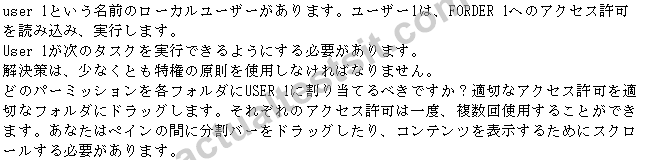

Correct Answer:
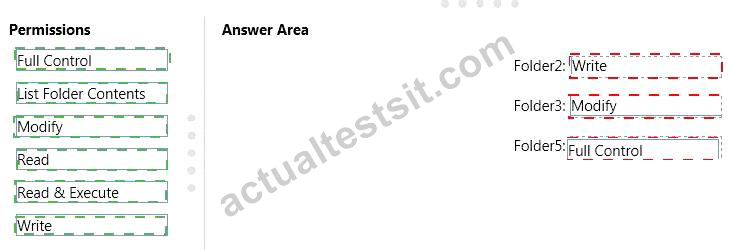
Explanation
Advanced permissions are detailed permissions that are grouped together to create the standard permissions.
The permissions in this question are standard permissions.
Folder2: To create new files in a folder, you need Write permission to the folder. The 'Write' standard permission includes the 'Create files / write data' advanced permission.
Folder3: To edit existing files in a folder, you need Modify permission.
Folder5: To change the permissions of files in a folder, you need the 'Change Permissions' advanced permission. The Change Permission advanced permission is in the 'Full Control' standard permission group.
Therefore, the answer for Folder5 is Full Control.
References:
http://windows.microsoft.com/en-gb/windows/before-applying-permissions-file-folder#1TC=windows-7
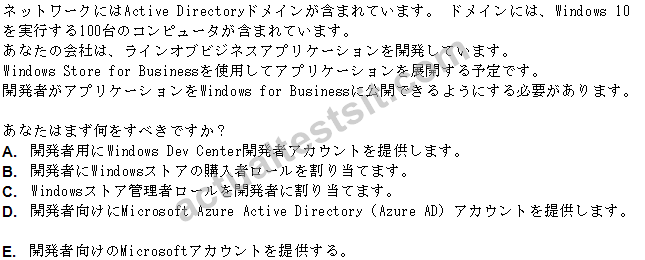
- A. Option B
- B. Option C
- C. Option A
- D. Option D
- E. Option E
Correct Answer: D 🗳️
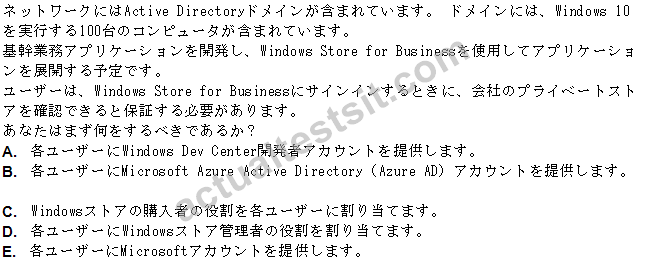
- A. Option B
- B. Option C
- C. Option A
- D. Option D
- E. Option E
Correct Answer: A 🗳️
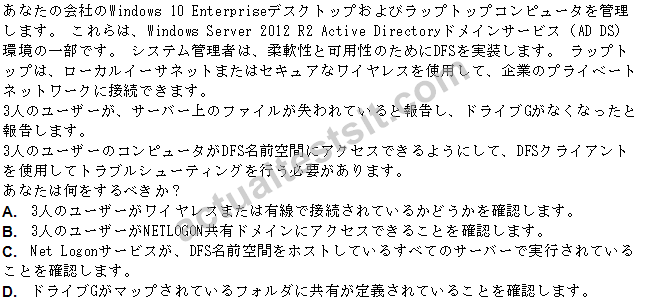
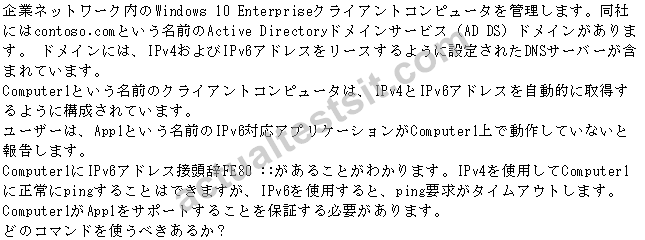
- A. ipconfig /renew6
- B. ipconfig /release6
- C. ipconfig /renew
- D. ipconfig /setclassid6
Correct Answer: C 🗳️
Explanation: Only visible for ActualTestsIT members. You can sign-up / login (it's free).
Viewing page 1 out of 68 pages.
Viewing questions 1-5 out of 340 questions.
 0 Customer ReviewsCustomers Feedback (* Some similar or old comments have been hidden.)
Instant Download 70-697日本語
After Payment, our system will send you the products you purchase in mailbox in a minute after payment. If not received within 2 hours, please contact us.
365 Days Free Updates
Free update is available within 365 days after your purchase. After 365 days, you will get 50% discounts for updating.

Money Back Guarantee
Full refund if you fail the corresponding exam in 60 days after purchasing. And Free get any another product.
Security & Privacy
We respect customer privacy. We use McAfee's security service to provide you with utmost security for your personal information & peace of mind.
