
Exam Name: Microsoft PowerPoint (PowerPoint and PowerPoint 2019) (MO-300日本語版)
Certification Provider: Microsoft
Corresponding Certification: Microsoft Specialist

Over 62146+ Satisfied Customers
Instant Download Microsoft : MO-300日本語 Exam Dumps

Updated: Nov 27, 2026
No. of Questions: 35 Questions & Answers
Download Limit: Unlimited
Instant Download: Upon successful payment, Our systems will automatically send the product you have purchased to your mailbox by email. (If not received within 12 hours, please contact us. Note: don't forget to check your spam.)
100% Money Back Guarantee
ActualTestsIT has an unprecedented 99.6% first time pass rate among our customers.  We're so confident of our products that we provide no hassle product exchange.
- Best exam practice material
- Three formats are optional
- Learn anywhere, anytime
- 100% Safe shopping experience
- 10 years of excellence
- 365 Days Free Updates
MO-300日本語 Online Test Engine
- Online Tool, Convenient, easy to study.
- MO-300日本語 Practice Online Anytime
- Instant Online Access MO-300日本語 Dumps
- Supports All Web Browsers
- Test History and Performance Review
- Supports Windows / Mac / Android / iOS, etc.
- Try Online Engine Demo
- Total Questions: 35
- Updated on: Nov 27, 2026
- Price: $79.00
MO-300日本語 Desktop Test Engine
- Installable Software Application
- Practice Offline Anytime
- Builds MO-300日本語 Exam Confidence
- Simulates Real MO-300日本語 Exam Environment
- Two Modes For MO-300日本語 Practice
- Supports MS Operating System
- Software Screenshots
- Total Questions: 35
- Updated on: Nov 27, 2026
- Price: $79.00
MO-300日本語 PDF Practice Q&A's
- Printable MO-300日本語 PDF Format
- Instant Access to Download MO-300日本語 PDF
- Study Anywhere, Anytime
- Prepared by Microsoft Experts
- Free MO-300日本語 PDF Demo Available
- 365 Days Free Updates
- Download Q&A's Demo
- Total Questions: 35
- Updated on: Nov 27, 2026
- Price: $79.00
The MO-300日本語 exam is hard on purpose — a Microsoft credential means something precisely because the bar is real. ActualTestsIT's 35 practice questions show you where that bar sits before you pay to find out.
Microsoft MO-300日本語 Exam Overview:
| Certification Vendor: | Microsoft |
|---|---|
| Exam Name: | Microsoft PowerPoint (PowerPoint and PowerPoint 2019) |
| Exam Number: | MO-300 |
| Available Languages: | English (Malaysia), Portuguese (Brazil), Chinese (Simplified), Italian, Spanish, Arabic (Saudi Arabia), Russian, English, Vietnamese, French, Chinese (Traditional), Dutch, Japanese, Polish, Indonesian, Greek, Korean, German |
| Exam Format: | Performance-based tasks, Interactive simulation, Proctored |
| Related Certifications: | Microsoft Office Specialist: Associate (Office 2019) |
| Exam Price: | $100 USD (varies by region) |
| Passing Score: | 700 out of 1000 |
| Exam Duration: | 50 minutes |
| Real Exam Qty: | 35–40 |
| Certificate Validity Period: | Valid for lifetime / No expiration |
| Recommended Training: | Microsoft Official Learning Resources |
| Exam Registration: | Certiport (for students/educators) Microsoft Learn & Pearson VUE |
| Sample Questions: | DOWNLOAD DEMO |
| Exam Way: | Online proctored or onsite testing center, closed-book, performance-based |
| Pre Condition: | No formal prerequisites; recommended 150 hours of instruction and hands-on experience |
| Official Syllabus URL: | https://learn.microsoft.com/en-us/certifications/exams/mo-300/ |
Microsoft MO-300日本語 Exam Syllabus Topics:
| Section | Weight | Objectives |
|---|---|---|
| Manage Slides | 15–20% | - Modify slide backgrounds - Reorder and group slides - Insert slides - Insert and modify slide headers and footers - Modify slide masters |
| Apply Transitions and Animations | 15–20% | - Animate text and objects - Set timing for transitions and animations - Configure slide show settings - Apply slide transitions |
| Manage Presentations | 15–20% | - Configure print settings - Inspect presentations - Configure presentation properties - Save presentations - Create presentations |
| Insert and Format Text, Shapes, and Images | 20–25% | - Insert and format text - Align objects - Insert and format shapes and text boxes - Insert and format images - Order and group objects |
| Insert Tables, Charts, SmartArt, 3D Models, and Media | 20–25% | - Insert and format tables - Insert and modify charts - Insert and format audio and video - Insert and format SmartArt graphics - Insert and format 3D models |
Straight Answers About the Microsoft MO-300日本語 Exam
The MO-300日本語 exam is Microsoft's benchmark for awarding the Microsoft Office Specialist: PowerPoint Associate (PowerPoint and PowerPoint 2019) certification, a credential positioned at the Associate level. It measures whether you can apply the Microsoft PowerPoint (PowerPoint and PowerPoint 2019) (MO-300日本語版) objectives under exam conditions — not whether you recognize them in a textbook. It also connects to a wider certification path that includes Microsoft Office Specialist: Associate (Office 2019), so the effort you invest here keeps paying off. That is exactly why preparation built on realistic questions outperforms passive reading.
The Microsoft PowerPoint (PowerPoint and PowerPoint 2019) (MO-300日本語版) blueprint spans 5 domains, headlined by Apply Transitions and Animations (15–20%), Insert Tables, Charts, SmartArt, 3D Models, and Media (20–25%), and Insert and Format Text, Shapes, and Images (20–25%). Read the weightings as a budget: the domains carrying more of the score deserve more of your week. The complete topic list lives in the exam topics section above — plan against it, not against guesswork.
The Microsoft PowerPoint (PowerPoint and PowerPoint 2019) (MO-300日本語版) exam gives you 50 minutes for 35–40 questions. Convert that into a rhythm before test day: minutes divided by questions is your per-item budget, and anything burning twice its budget gets flagged and revisited at the end. Rehearse the pacing under a real timer — every ActualTestsIT engine session runs one — until finishing with spare review time becomes normal.
Passing Microsoft PowerPoint (PowerPoint and PowerPoint 2019) (MO-300日本語版) requires 700 out of 1000, and each attempt costs $100 USD (varies by region) — retakes included, at full price. The financially rational move is arriving over-prepared: drill with ActualTestsIT practice questions until your timed scores clear the bar several sessions in a row, then register. That's not caution; it's refusing to pay for the same exam twice.
Microsoft lists the Microsoft PowerPoint (PowerPoint and PowerPoint 2019) (MO-300日本語版) question formats as: Performance-based tasks, Interactive simulation, Proctored. Formats are not trivia — they change how you read. For long scenario stems, find the actual question sentence first; for multi-answer items, verify every option you select. ActualTestsIT's 35 practice questions cover these formats thoroughly, so on exam day only the content is new.
The MO-300日本語 exam is offered in English, English (Malaysia), German, Spanish, Indonesian, Korean, Dutch, Italian, Russian, French, Portuguese (Brazil), Polish, Greek, Chinese (Simplified), Chinese (Traditional), Japanese, Arabic (Saudi Arabia), Vietnamese. Pick the language where your reading speed holds up under time pressure — in a timed exam, slow comprehension is a hidden tax on every question. If you test in English, daily work with ActualTestsIT's English MO-300日本語 practice questions doubles as targeted vocabulary training.
The certification earned through the Microsoft PowerPoint (PowerPoint and PowerPoint 2019) (MO-300日本語版) exam remains valid for Valid for lifetime / No expiration. Note the expiry date early and research the recertification path well before it arrives — a planned renewal is an errand, an expired credential is a project. Microsoft owns these policies, so confirm the current rules on the official certification page as your window approaches.
All three versions contain the same 35 expert-written questions — what you're choosing is a study environment:
- PDF version — printable, expert-prepared, instantly downloadable, readable anywhere, anytime. Includes 365 days of free updates and a free demo.
- Desktop Test Engine — Windows software that simulates the real exam environment, with two practice modes, offline access, and unlimited installations.
- Online Test Engine — runs in any web browser on Windows, Mac, Android, and iOS, with test history and performance review built in.
Many candidates combine formats — the PDF for reading, an engine for timed rehearsal.
Yes. ActualTestsIT's free Microsoft PowerPoint (PowerPoint and PowerPoint 2019) (MO-300日本語版) PDF demo contains genuine sample questions with verified answers, so you can judge the quality before spending anything. Every purchase includes 365 days of free updates, and renewing after that costs 50% of the regular price from your member zone. Test-drive first — confident material has nothing to hide.
Continuously. As Microsoft adjusts the Microsoft PowerPoint (PowerPoint and PowerPoint 2019) (MO-300日本語版) exam, our experts revise the bank to match, and customer feedback feeds the same review loop. Updates are free for 365 days through your member zone; track them via the New Releases section or the ActualTestsIT newsletter, and re-check your version 3-4 days before your exam. Expired products repurchase at 50% off to restart the service.
Support runs around the clock: free online consultation whenever you need it, remote guidance for installation or usage issues, and patient responses to content questions by email — suggestions are genuinely welcomed. On privacy, your purchase information is firmly protected: transactions are secured by McAfee security services, customer data is never disclosed to third parties, and no spam or telemarketing follows your order.
Delivery first: your Microsoft PowerPoint (PowerPoint and PowerPoint 2019) (MO-300日本語版) practice questions are downloadable instantly and emailed within one minute of payment — if 2 hours pass, check spam and contact support. Install on as many computers as you need. If the exam doesn't go your way, the 100% Money Back Guarantee applies: take the corresponding exam within 60 days of purchase, and if you don't pass, submit a scanned enrollment slip and your official Score Report PDF within 2 days after the exam — full refunds are processed within 7 days. Not eligible: attempts within 3 days of purchase, exams never actually taken, free items, and expired orders; the candidate name must match the payer name. Prefer to keep preparing? Exchange for two free products of equal value and retain your update service.
Microsoft PowerPoint (PowerPoint and PowerPoint 2019) (MO-300日本語版) Sample Questions:
「課外活動」スライドで、表の最後に行を挿入します。行に、「スポーツイベント」と入力します。
「イベント」列と「価格」列の「$ 175」。
Correct Answer:
See the Steps below
* To add a row above the selected cell, click Insert Above.
* To add a row below the selected cell, click Insert Below. Notes: To add a row at the end of a table, you can click the rightmost cell of the last row, and then press TAB.
スライド2のコンテンツプレースホルダーに、垂直曲線リストのSmartArtグラフィックを挿入します。最初の形状にラベルを付ける
「構造」と2番目の形状「多年生植物」、未使用の形状を削除します。
Correct Answer:
See the steps below.
* Select the slide where you want the SmartArt graphic to appear.
* From the Insert tab, select the group.
* A dialog box will appear. Select a category on the left, choose the desired SmartArt graphic, then click OK.
* The SmartArt graphic will appear on the current slide.
スライド5で、[描画]タブを使用してテキスト「???」を強調表示します。黄色の6mm蛍光ペンを使用すると、ほぼ次のようになります。
Correct Answer:
See the steps below.
* Select the text that you want to
* On the Home tab, select the arrow next to
* Choose a color. The text you selected will be in the color you chose
Topic 4, Screen TimeExhibit.

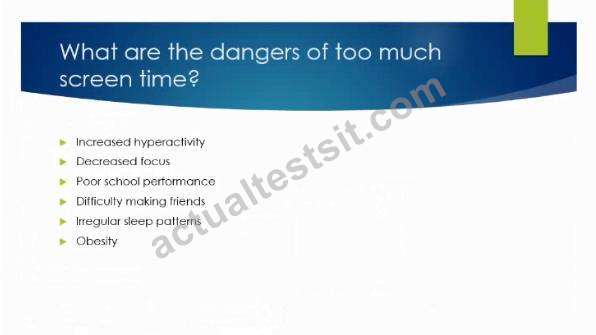

「WhoAre」スライドで、斜角遠近法の左、白の画像スタイルとペイントブラシの芸術的効果を画像に適用します。
Reveal Solution Discussion 0Correct Answer:
See the Steps below
Explanation
1. Select the picture.
2. Select Picture Tools > Format and select
3. Hover over the options to preview them and select the one you want.
Topic 2, TravelExhibit.


Viewing page 1 out of 9 pages.
Viewing questions 1-4 out of 35 questions.
 0 Customer ReviewsCustomers Feedback (* Some similar or old comments have been hidden.)
Instant Download MO-300日本語
After Payment, our system will send you the products you purchase in mailbox in a minute after payment. If not received within 2 hours, please contact us.
365 Days Free Updates
Free update is available within 365 days after your purchase. After 365 days, you will get 50% discounts for updating.

Money Back Guarantee
Full refund if you fail the corresponding exam in 60 days after purchasing. And Free get any another product.
Security & Privacy
We respect customer privacy. We use McAfee's security service to provide you with utmost security for your personal information & peace of mind.
