

[Jan-2026] Get 100% Real XK0-005 Free Online Practice Test
BEST Verified CompTIA XK0-005 Exam Questions (2026)
CompTIA XK0-005 (CompTIA Linux+ Certification) exam is designed to test the skills and knowledge of IT professionals who work with Linux operating systems. Linux has become an increasingly popular operating system for servers and other computing environments, and IT professionals who are proficient in Linux are in high demand. Earning the CompTIA Linux+ certification demonstrates that an IT professional has the necessary knowledge and skills to work with Linux and can add value to their organization.
The CompTIA Linux+ Certification Exam certification is ideal for IT professionals who work with Linux systems in their daily operations. This includes system administrators, network administrators, cybersecurity professionals, and other IT professionals who are responsible for managing Linux systems. The CompTIA Linux+ certification is recognized globally by technology companies and government agencies, making it a valuable certification to have for professionals seeking career advancement opportunities. Additionally, the certification is vendor-neutral, which means that it is not tied to any specific Linux distribution or technology provider.
CompTIA Linux+ certification is a vendor-neutral certification that validates the skills of IT professionals in managing Linux operating systems. CompTIA Linux+ Certification Exam certification is a globally recognized credential that demonstrates an individual's capability to perform tasks related to Linux administration, configuration, and troubleshooting. The CompTIA XK0-005 exam is the latest version of the CompTIA Linux+ certification exam that tests the candidate's proficiency in managing Linux systems.
NEW QUESTION # 185
A systems administrator pressed Ctrl+Z after starting a program using the command line, and the shell prompt was presented. In order to go back to the program, which of the following commands can the administrator use?
- A. bg
- B. ed
- C. fg
- D. su
Answer: C
NEW QUESTION # 186
Which of the following is the BEST reason for not storing database files in the /var directory?
- A. The number of files in /var is limited by the available inodes.
- B. If log files fill up /var, it might corrupt the database.
- C. The /var filesystem is not fast enough for database files.
- D. Files in /var do not have strict file permissions.
Answer: B
NEW QUESTION # 187
A Linux engineer has been notified about the possible deletion of logs from the file /opt/app/logs. The engineer needs to ensure the log file can only be written into without removing previous entries.
Which of the following commands would be BEST to use to accomplish this task?
- A. chattr +c /opt/app/logs
- B. chattr +d /opt/app/logs
- C. chattr +a /opt/app/logs
- D. chattr +i /opt/app/logs
Answer: C
Explanation:
Explanation
The command chattr +a /opt/app/logs will ensure the log file can only be written into without removing previous entries. The chattr command is a tool for changing file attributes on Linux file systems. The +a option sets the append-only attribute, which means that the file can only be opened in append mode for writing. This prevents the file from being modified, deleted, or renamed. This is the best command to use to accomplish the task. The other options are incorrect because they either set the wrong attributes (+d, +i, or +c) or do not affect the file at all (-a). References: CompTIA Linux+ (XK0-005) Certification Study Guide, Chapter 11: Managing Files and Directories, page 357.
NEW QUESTION # 188
A Linux administrator copied a Git repository locally, created a feature branch, and committed some changes to the feature branch.
Which of the following Git actions should the Linux administrator use to publish the changes to the main branch of the remote repository?
- A. tag
- B. push
- C. commit
- D. rebase
Answer: B
Explanation:
The push action is used to publish the changes made in a local branch to a remote branch of a Git repository. This action will update the remote branch with the commits made in the local branch and synchronize the two branches. The rebase action is used to reapply commits from one branch onto another branch, creating a linear history of commits. This action does not publish any changes to a remote repository. The tag action is used to create an annotated reference to a specific commit in a Git repository. This action does not publish any changes to a remote repository. The commit action is used to record changes made in the local repository and create a new snapshot of the project state. This action does not publish any changes to a remote repository.
NEW QUESTION # 189
A Linux administrator is configuring crontab and needs to schedule a task to run only on Saturday and Sunday at 9:00 a.m. every week of the year. Which of the following should the administrator use?
- A. 0 9 * * 6,0 root /root/script.sh
- B. 0 9 1 * * root /root/script.sh
- C. 0 9 1 */3 * root /root/script.sh
- D. 0 9 * * 1-5 root /root/script.sh
Answer: A
Explanation:
Comprehensive and Detailed Step-by-Step
0 9 * * 6,0 ensures execution at 9:00 AM on Saturdays (6) and Sundays (0).
1-5 would run the script Monday-Friday.
*/3 is incorrect because it runs every three days.
1 * * runs only on the 1st day of each month.
NEW QUESTION # 190
An administrator needs to increase the system priority of a process with PID 2274. Which of the following commands should the administrator use to accomplish this task?
- A. nice -15 2274
- B. ps -ef I grep 2274
- C. renice -n -15 2274
- D. echo "-15" > /proc/PID/2274/priority
Answer: C
Explanation:
The renice command is used to change the priority of a running process by specifying its PID and the new nice value. The -n flag indicates the amount of change in the nice value, which can be positive or negative. A lower nice value means a higher priority, so -15 will increase the priority of the process with PID 2274. The administrator needs to have root privileges to do this.
Reference:
The renice command is listed as one of the commands to manipulate process priority in the web search result 1.
The renice command is also explained with examples in the web search result 2.
The CompTIA Linux+ Certification Exam Objectives mention that the candidate should be able to "manage process execution priorities" as part of the System Operation and Maintenance domain1.
NEW QUESTION # 191
Which of the following would allow remote users to access a corporate server? (Choose two.)
- A. SMTP server
- B. NTP server
- C. VPN server
- D. DHCP server
- E. File server
- F. SSH server
Answer: C,F
NEW QUESTION # 192
A systems administrator is encountering performance issues. The administrator runs 3 commands with the following output
The Linux server has the following system properties
CPU: 4 vCPU
Memory: 50GB
Which of the following accurately describes this situation?
- A. The system has been running for over a year and requires a reboot.
- B. The system requires more memory
- C. Too many users are currently logged in to the system
- D. The system is under CPU pressure and will require additional vCPUs
Answer: D
Explanation:
Based on the output of the image sent by the user, the system is under CPU pressure and will require additional vCPUs. The output shows that there are four processes running upload.sh scripts that are consuming a high percentage of CPU time (99.7%, 99.6%, 99.5%, and 99.4%). The output also shows that the system has only 4 vCPUs, which means that each process is using almost one entire vCPU. This indicates that the system is struggling to handle the CPU load and may experience performance issues or slowdowns.
Adding more vCPUs to the system would help to alleviate the CPU pressure and improve the system performance. The system has not been running for over a year, as the uptime command shows that it has been up for only 1 day, 2hours, and 13 minutes. The number of users logged in to the system is not relevant to the performance issue, as they are not consuming significant CPU resources. The system does not require more memory, as the free command shows that it has plenty of available memory (49 GB total, 48 GB free). References: CompTIA Linux+ (XK0-005) Certification Study Guide, Chapter 15: Managing Memory and Process Execution, pages 468-469.
NEW QUESTION # 193
A Linux engineer finds multiple failed login entries in the security log file for application users. The Linux engineer performs a security audit and discovers a security issue. Given the following:
# grep -iE '*www*|db' /etc/passwd
www-data:x:502:502:www-data:/var/www:/bin/bash
db:x: 505:505:db: /opt/db:/bin/bash
Which of the following commands would resolve the security issue?
- A. chsh -s /bin/false www-data && chsh -s /bin/false db
- B. renice -n 1002 -u 502 && renice -n 1005 -u 505
- C. usermod -d /srv/www-data www-data && usermod -d /var/lib/db db
- D. passwd -u www-data && passwd -u db
Answer: A
Explanation:
This command will use the chsh tool to change the login shell of the users www-data and db to /bin/false, which means they will not be able to log in to the system1. This will prevent unauthorized access attempts and improve security.
NEW QUESTION # 194
A Linux administrator wants a permission bit on a shared folder that allows only the owner of the file within that directory or the root user to delete or rename the file. Which of the following commands will help achieve this goal?
- A. chmod u+w /directory/
- B. chmod o+t /directory/
- C. chmod g+s /directory/
- D. chmod a+r /directory/
Answer: C
Explanation:
The +t option sets the "sticky bit" on a directory, which restricts deletion or renaming of files in the directory to the file's owner or the root user. This is commonly used in shared directories like
/tmp, where multiple users may have access, but only the file owner should be allowed to modify their own files. The command chmod o+t /directory/ applies this permission.
NEW QUESTION # 195
A Linux systems administrator installed a new web server, which failed while attempting to start.
The administrator suspects that SELinux is causing an issue and wants to temporarily put the system into permissive mode. Which of the following would allow the administrator to accomplish this?
- A. sestatus 0
- B. chcon httpd_sys_content_t /var/
- C. echo SELINUX=PERMISSIVE >> /etc/sysconfig/selinux
- D. setenforce 0
Answer: D
Explanation:
In sudo setenforce 0, you can use permissive instead of 0. This command changes SELinux mode from targeted to permissive. In permissive mode, the service is active and audits all actions. However, it does not enforce any security policies.
NEW QUESTION # 196
A junior developer is unable to access an application server and receives the following output: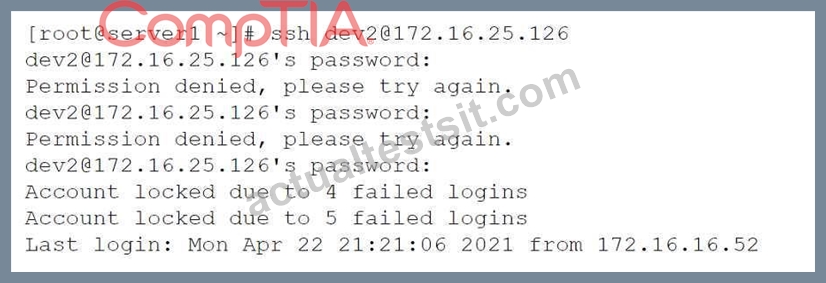
The systems administrator investigates the issue and receives the following output:
Which of the following commands will help unlock the account?
- A. pam_tally2 --user=dev2
- B. pam_tally2 --user=dev2 --quiet
- C. pam_tally2 --user+dev2 --quiet
- D. pam_tally2 --user=dev2 --reset
Answer: D
Explanation:
To unlock an account that has been locked due to login failures, the administrator can use the command pam_tally2 --user=dev2 --reset (D). This will reset the failure counter for the user
"dev2" and allow the user to log in again.
NEW QUESTION # 197
A junior Linux administrator is trying to verify connectivity to the remote host host1 and display round-trip statistics for ten ICMP.
Which of the following commands should the administrator execute?
- A. pathping -c 10 host1
- B. traceroute -c 10 host1
- C. ping -c 10 host1
- D. netstat host1
Answer: C
Explanation:
https://shapeshed.com/unix-ping/
NEW QUESTION # 198
An administrator would like to mirror the website files on the primary web server, www1, to the backup web server, www2. Which of the following commands should the administrator use to most efficiently accomplish this task?
- A. [ wwwl ] scp -r /var/www/html user1@www2 : / var/www/html
- B. [wwwl ] cd /var/www/html && tar cvf -
- C. [www2 ] cd /var/www/html; wget -m http: //wwwl/
- D. [wwwl ] rsync -a -e ssh /var/www/html/ user1@www2 : /var/www/html
Answer: D
Explanation:
To mirror the website files on the primary web server, www1, to the backup web server, www2, the administrator can use the command rsync -a -e ssh /var/www/html/ user1@www2:/var/www/html (A). This will synchronize all files and directories under /var/www/html/ on www1 to /var/www/html on www2 using ssh as the remote shell. The -a option will preserve all attributes and permissions of the files. The other commands will not mirror the website files, but either copy them once, download them from a web server, or archive them. Reference:
[CompTIA Linux+ Study Guide], Chapter 12: Troubleshooting Linux Systems, Section: Synchronizing Files with rsync
[How to Use rsync Command in Linux]
NEW QUESTION # 199
A systems administrator is deploying three identical, cloud-based servers. The administrator is using the following code to complete the task: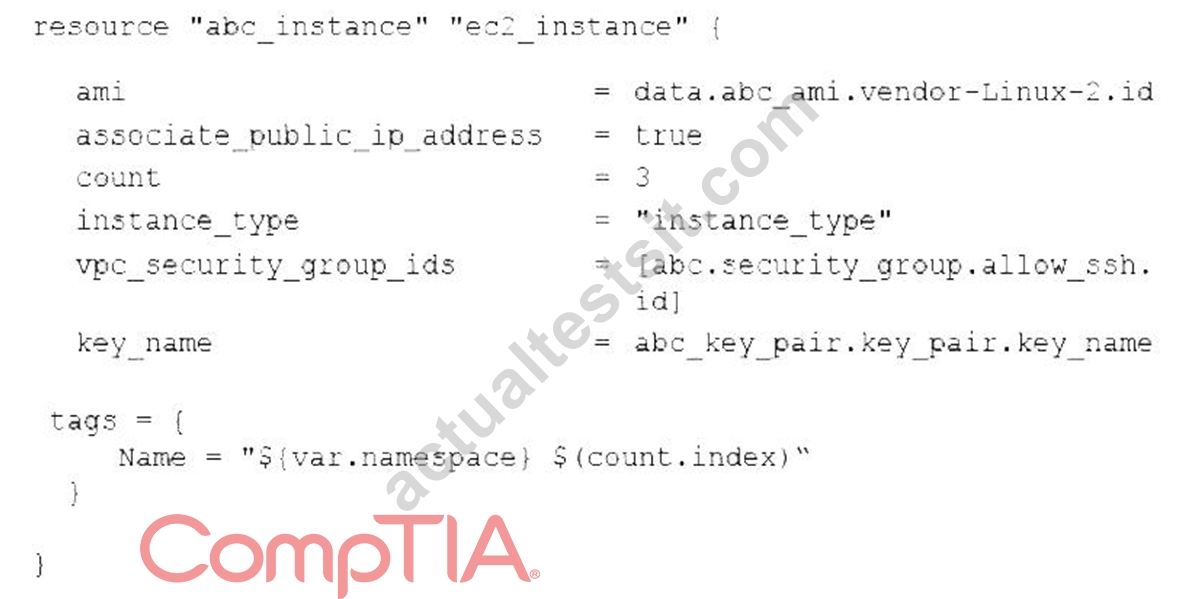
Which of the following technologies is the administrator using?
- A. Puppet
- B. Ansible
- C. Terraform
- D. Chef
Answer: C
Explanation:
The code snippet is written in Terraform language, which is a tool for building, changing, and versioning infrastructure as code. Terraform uses a declarative syntax to describe the desired state of the infrastructure and applies the changes accordingly. The code defines a resource of type aws_instance, which creates an AWS EC2 instance, and sets the attributes such as the AMI ID, instance type, security group IDs, and key name. The code also uses a count parameter to create three identical instances and assigns them different names using the count.index variable. This is the correct technology that the administrator is using. The other options are incorrectbecause they use different languages and syntaxes for infrastructure as code. References: CompTIA Linux+ (XK0-005) Certification Study Guide, Chapter 19: Managing Cloud and Virtualization Technologies, page 559.
NEW QUESTION # 200
An administrator transferred a key for SSH authentication to a home directory on a remote server. The key file was moved to .ssh/authorized_keys location in order to establish SSH connection without a password.
However, the SSH command still asked for the password. Given the following output:
Which of the following commands would resolve the issue?
- A. restorecon .ssh/authorized_keys
- B. chown root:root .ssh/authorized_keys
- C. ssh_keygen -t rsa -o .ssh/authorized_keys
- D. chmod 600 .ssh/authorized_keys
Answer: D
Explanation:
The command that would resolve the issue is chmod 600 .ssh/authorized_keys. This command will change the permissions of the .ssh/authorized_keys file to 600, which means that only the owner of the file can read and write it. This is necessary for SSH key authentication to work properly, as SSH will refuse to use a key file that is accessible by other users or groups for security reasons. The output of ls -l shows that currently the .ssh
/authorized_keys file has permissions of 664, which means that both the owner and group can read and write it, and others can read it.
The other options are not correct commands for resolving the issue. The restorecon .ssh/authorized_keys command will restore the default SELinux security context for the .ssh/authorized_keys file, but this will not change its permissions or ownership. The ssh_keygen -t rsa -o .ssh/authorized_keys command is invalid because ssh_keygen is not a valid command (the correct command is ssh-keygen), and the -o option is used to specify a new output format for the key file, not the output file name. The chown root:root .ssh
/authorized_keys command will change the owner and group of the .ssh/authorized_keys file to root, but this will not change its permissions or make it accessible by the user who wants to log in with SSH key authentication. References: How to Use Public Key Authentication with SSH; chmod(1) - Linux manual page
NEW QUESTION # 201
Based on an organization's new cybersecurity policies, an administrator has been instructed to ensure that, by default, all new users and groups that are created fall within the specified values below.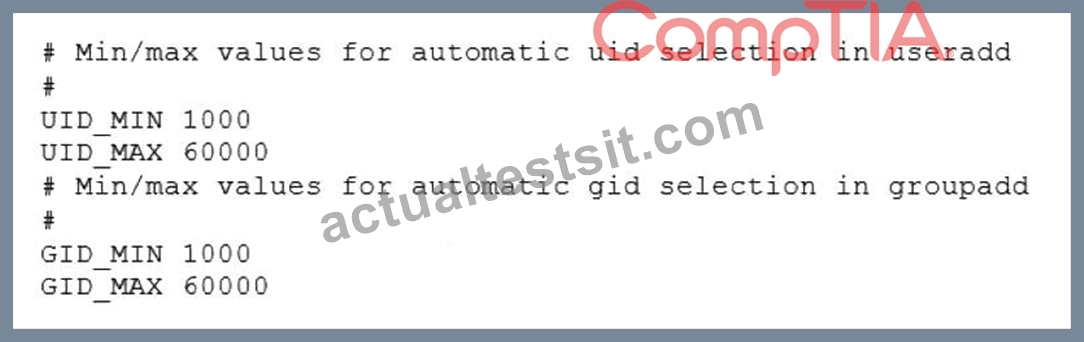
To which of the following configuration files will the required changes need to be made?
- A. /etc/security/limits.conf
- B. /etc/login.defs
- C. /etc/default/useradd
- D. /etc/profile
Answer: B
Explanation:
The required changes need to be made to the /etc/login.defs configuration file. The /etc/login.defs file defines the default values for user and group IDs, passwords, shells, and other parameters for user and group creation.
The file contains the directives UID_MIN, UID_MAX, GID_MIN, and GID_MAX, which set the minimum and maximum values for automatic user and group ID selection. The administrator can edit this file and change the values to match the organization's new cybersecurity policies. This is the correct file to modify to accomplish the task. The other options are incorrect because they either do not affect the user and group IDs (
/etc/security/limits.conf or /etc/profile) or do not set the default values (/etc/default
/useradd). References: CompTIA Linux+ (XK0-005) Certification Study Guide, Chapter 15: Managing Users and Groups, page 463.
NEW QUESTION # 202
A user sends a request to access a virtual server via SSH. Which of the following commands is used to open the SSH standard port?
- A. iptables-save | grep dport-22/tcp
- B. iptables -A INPUT -p tcp --dport sshd -j ACCEPT
- C. firewalld-cmd --remove-service=ssh --permanent
- D. firewalld-cmd --permanent --add-port=22/tcp
Answer: D
Explanation:
The correct way to open a port for SSH using firewalld is:
bash
firewalld-cmd --permanent --add-port=22/tcp
* This command allows TCP traffic on port 22 (the default port for SSH).
* Option B only displays saved rules and doesn't open the port.
* Option C contains incorrect syntax: --dport sshd is invalid (sshd is a daemon, not a port number).
* Option D removes the SSH service from the firewall, which is the opposite of the requirement.
Reference:CompTIA Linux+ XK0-005 Official Study Guide, Domain 3.0 - Security
"Use firewalld-cmd --permanent --add-port=22/tcp to allow SSH traffic through firewalld."
NEW QUESTION # 203
A server's IP address has been changed from 10.115.6.5 to 10.116.6.5. Because of this change, the application server needs to be reconfigured. Which of the following commands will allow the systems engineer to change the IP address in the /etc/app.cfgfile quickly?
- A. awk '{rep(/10.115.6.5/"10.116.6.5")}" /etc/app.cfg
- B. perl -i 's/10.115.6.5/10.116.6.5/g" /etc/app.cfg
- C. python -c "import sys;print file.replace('10.115.6.5','10.116.6.5')" <
/etc/app.cfg - D. sed -i 's/10.115.6.5/10.116.6.5/g' /etc/app.cfg
Answer: D
Explanation:
Explantation:
The sed(Stream Editor) command is commonly used for text replacement in files.
-i- Edits the file in place (modifies /etc/app.cfgdirectly).
s/old/new/g- Replaces all occurrences (g= globally) of 10.115.6.5with 10.116.6.5.
/etc/app.cfg- Specifies the file to modify.
NEW QUESTION # 204
......
XK0-005 Exam Dumps, Practice Test Questions BUNDLE PACK: https://www.actualtestsit.com/CompTIA/XK0-005-exam-prep-dumps.html
The Best Practice Test Preparation for the XK0-005 Certification Exam: https://drive.google.com/open?id=1saCpHob9j7gYM4H2HLlePuxeYMtj8Z6P